View Project
Period
10 weeks, 2.5 months
Roles
Tools
Figma、FigJam、Claude Code
Website Link

Overview
The "Iko" app is a management tool designed for operators of small-scale co-living properties (comprising 1–15 units) that cater primarily to international professionals, out-of-town workers, and students. Its core concept aims to overcome the challenges inherent in the typical "hotel-style" management model—which often requires significant manpower to handle the myriad of minor issues that arise, such as resolving disputes, cleaning, and addressing wear and tear. By shifting the responsibility for household chores and property upkeep back to the tenants, the app not only reduces management costs for operators but also fosters a sense of community and shared responsibility, creating a living environment that embodies true co-living.
Values
The original vision behind co-living residences is to enable tenants from diverse cultural backgrounds to meet, make friends, and experience family-like connections while living away from home. The "iko" co-living app provides a digital space that bridges communication gaps and uses gamification to transform household chores into highly interactive, fun activities; by fostering an environment where tenants proactively solve problems themselves, the app creates a win-win situation for both operators and tenants.
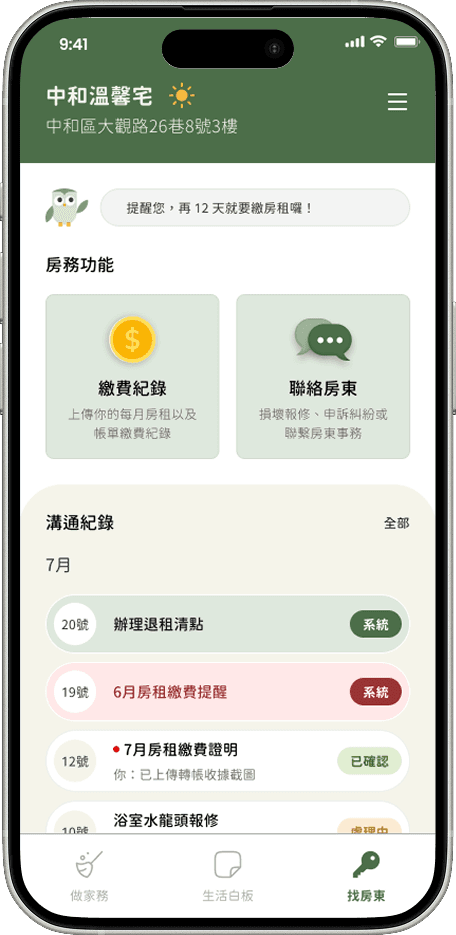
The Contact feautre
Design Process
This product design process integrates AI throughout the workflow; AI assisted in research, discussion, and analysis across all stages—from initial market and competitor research and target user analysis (specifically property management and leasing operators) to the definition of MVP features. Interface design and iterations were executed in Figma, followed by frontend and backend development using Claude Code. Finally, user testing was conducted using online physical test devices to gather feedback for further product iteration.
Define Users
The target user group is defined as:
Property Managers: Small-scale (fewer than 15 units) rental management operators or landlords in Taiwan.
Tenants: International students or professionals from other regions working in Taiwan.
Taiwan was selected as the target market due to its unique cultural and social context; most tenants and landlords rely on LINE for communication and interaction. However, this tool has limitations, and the issues arising from its use became the problems that this app was designed to address.
Problem
Under a system of remote, centralized management, the roster for shared chores is difficult to implement effectively; tenants often neglect housework due to personal reasons or a lack of proper oversight, eventually leading to a collective disregard for the rules regarding environmental maintenance.
Language barriers, differences in lifestyle habits, and awkward social interactions make it difficult for co-living tenants to forge a sense of cohesion or belonging. Furthermore, LINE groups established by management often devolve into one-way communication channels dominated by the management, while also significantly driving up management costs.
LINE messages are ephemeral and tied to individual accounts; they can be lost when personnel changes occur, potentially leading to disputes and legal risks.
Solution
The design of MVP features for the tenant-facing side is guided by three key user pain points: the Chore module, the Whiteboard module, and the Contact module.
Chores Module: A feature for autonomous chore management characterized by high interactivity, ease of implementation and verification, and built-in oversight mechanisms.
Whiteboard Module: Provides tenants with a platform for friendly, open communication and interaction.
Contact Module: Every communication between landlord and tenant is fully recorded and stored, making it easy to retrieve.
Chores Module
Duty roster rotation, new household chores, and notifications regarding rewards for completing chores.
Whiteboard Module
Property announcements, event broadcasts, and stickers or notes for tenant-to-tenant interaction.
Contact Module
Contact details for the landlord, proof of payment, and all records of communication.
The design direction for the MVP features on the landlord side focuses on supporting tenant-facing functions and enhancing management value for landlords, comprising the following modules: Dashboard, Property, and Broadcast.
Dashboard Module: Serves primarily as a management dashboard for landlords, displaying rent collection, tenancy, operations, and message logs based on events.
Property Module: A hub for landlords to manage all their properties, allowing them to send announcements, handle household tasks, and manage all property-related communications.
Broadcast Module: An interface for landlords to push marketing campaigns across multiple properties.
Dashboard Module
A dashboard displaying the latest updates, rent collection and housing status, and an operational overview.
Property Module
Overview of properties across regions, sending announcements for individual properties, contacting tenants, and property-related functions.
Broadcast Module
Added a broadcast feature for events, information, and promotions spanning all objects.
Design Mockups
UI Design and Mockup Presentation
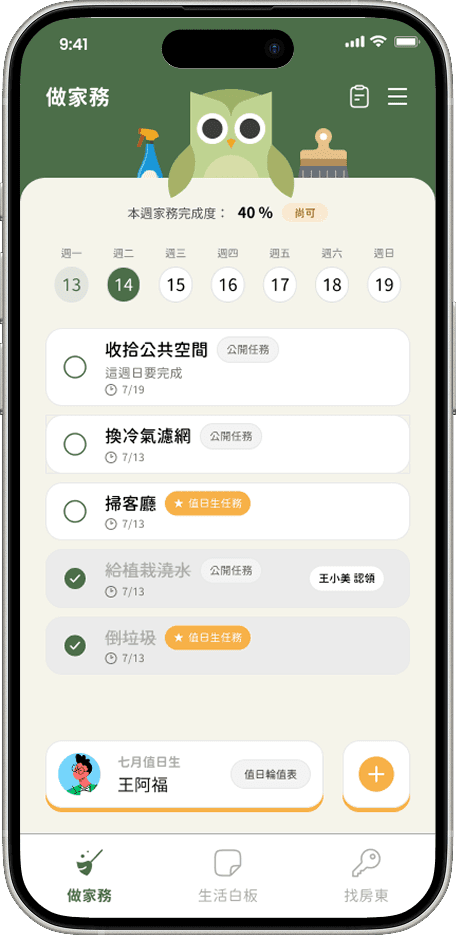


Three Key Features for Tenants
(Left to Right: Chores, Whiteboard, Contact)


Three Key Features for Landlords (Property Managers)
(Left to Right: Dashboard, Property, Broadcast)
Visual design for Chore interactions
(from left to right: standard view, chore completed, duty roster member who missed their turn last week)
Designed for the various presentation formats of the Whiteboard
(From left to right: Card view, list view, sticky note view)
Design Mockups
Prototype
Simulated screen image from the first-version test unit
Learnings and Takeaways
This was my first time making extensive use of AI for a side project and significantly accelerating its integration into my design workflow. Through this process, I learned:
Learn to embrace AI tools and continuously experiment with integrating them into your design workflow.
Jenny, a former Design Director at Figma, once remarked in a talk that the traditional design process is dead; however, I believe AI merely drastically accelerates the speed of UX design rather than completely replacing it. AI is highly efficient in the preliminary research phase—whether it involves analyzing competitors, reviewing secondary data, or profiling target user groups. Yet, when it comes to actual design decisions—such as interface layouts, the intricacies of interaction design flows, or visual design proposals—it offers limited assistance. We must embrace these tools while simultaneously honing our skills, cultivating our aesthetic sensibilities, and developing the ability to uncover insights; only then can we make sound design decisions and persuasively articulate our design rationale to others.
Use AI tools with caution; remember that AI can also make mistakes.
When planning features for the MVP, I share my functional architecture (sitemap) with the AI to engage in an iterative dialogue. The AI often offers subjective suggestions, though these tend to lean more toward business considerations than user experience. This back-and-forth process serves as a rapid way to narrow down broad concepts and strike a balance between business requirements and user needs. At times, however, the AI fails to grasp the nuances of human communication, gets stuck in circular reasoning, or contradicts itself while trying to explain its own errors. While the AI is excellent for generating a wide range of ideas, it can only play a supporting role when it comes to making concrete design decisions.
Standardization and documentation can serve as excellent ways to communicate and collaborate with AI.
During the development of the prototype, AI often struggles to perfectly render the UI exactly as depicted in the design mockups. To address this, I use a method where I have the AI—while in planning mode—conduct a detailed comparison between the frontend interface and the design, generating a report for my review. This approach significantly bridges the communication gap between me and Claude Code; it also helps me re-evaluate the design trade-offs made during iteration, making the process incredibly convenient.